
Release Notes
Truck and Driver OR definitions, MapLedger Benchmarks fix
Truck OR and Driver OR are now defined in the Glossary, MapLedger Benchmarks build their population from closed months only, and a refresher on reading Fuel by Bill To.
This release adds Truck OR and Driver OR definitions to the Glossary, corrects how MapLedger Benchmarks build their population averages and ranges, and revisits the Fuel by Bill To view.
Highlights
- Truck OR and Driver OR — both truck- and driver-level operating ratios are now defined in the FreightMath Glossary.
- MapLedger Benchmarks — population averages and ranges now include only closed (held) months.
- Fuel by Bill To — a reminder on reading weekly fuel surcharge per mile by customer, with a one-click drill into each Bill To.
- Historical results loading — performance work with the Nussbaum Technology team has shipped, speeding up how quickly historical results load.
What's new
Truck OR and Driver OR added to the Glossary
The Glossary now defines both truck- and driver-level operating ratios. Each spreads the period's total overhead cost evenly across the population it measures, so every truck — or every driver — carries the same overhead regardless of how much freight they ran.
- Truck OR: How the truck performs as an asset. Overhead is divided by the number of trucks, and that equal share sits on top of the load-level cost of the freight the truck ran.
- Driver OR: How the driver performs. Overhead is divided by the number of drivers, and that equal share sits on top of the load-level cost of the freight the driver ran.
Because the two ratios divide overhead across different populations, a truck and a driver paired 1:1 will still post different ORs — each is measured against its own peer group.
Search the Glossary for either term, or use the share button on the entry to copy a direct link and send it to anyone on your team comparing truck or driver performance.
Reminder
Fuel by Bill To
Fuel by Bill To lays out fuel surcharge per mile (FSC/Mi) by week for each Bill To, with a Total column across the full range. It is a quick way to spot customers whose fuel surcharge recovery is drifting, inconsistent week to week, or missing altogether — any Bill To running $0.000.
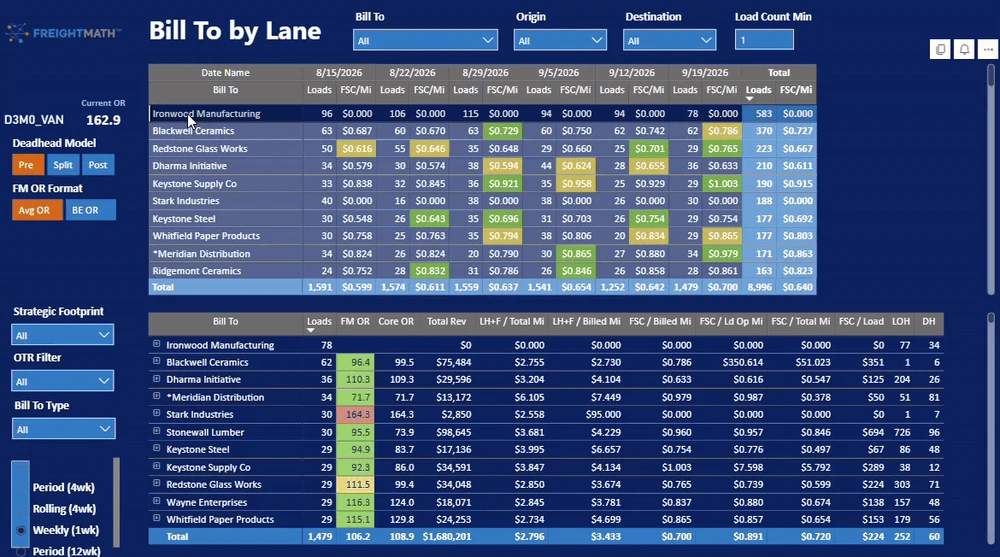
Scan the weekly FSC/Mi columns for outliers, then select a Bill To to populate the detail table below with that customer's FM OR, Core OR, Total Revenue, LH+F per Total and Billed Mile, FSC per Billed, Loaded Op, and Total Mile, FSC/Load, LOH, and DH. Use the Bill To, Origin, Destination, and Load Count Min filters to narrow the view.
Improvements
- Historical results: Code fixes built with the Nussbaum Technology team improve how quickly historical results load. The work is deployed.
Fixes
- MapLedger, Review, Benchmarks: A recent code release allowed months that had not yet been closed (held) by each carrier to be included in the Benchmarks population for all % of Revenue and per Mile measures. As a result, population averages and ranges were not accurate, even where results still fell within Normal Ranges. Benchmarks now include only closed months. The correction is deployed.
In development
- Spot Check and Trip Check — the two apps are targeted for deployment on October 6.
- API access — currently in beta.