Release Notes
Spot Check app deprecation notice, estimated Driver Pay, and deadhead model defaults
The legacy Spot Check app retires November 15. Driver Pay for the most recent week is now estimated rather than costed from partial payroll, and the Deadhead Model slicer gains an Auto option.
This release changes how FreightMath handles Driver Pay for the most recent week. Instead of costing that week with partial payroll data, FreightMath now estimates it. Driver Pay is also now sorted into three buckets so you can tell where each dollar came from. This release also adds deadhead model defaults, so the dashboard can follow the deadhead model configured for your network.
We will be deprecating the old Spot Check app as of November 15. On November 15, we will be redirecting all traffic from the legacy app to app.freightmath.com. Users do not require any specific Microsoft license to access the new Spot Check, Trip Check and Dedicated Pricing apps.
Our objective is to deprecate all current private Microsoft SharePoint sites by the end of November, at which point all current features and dashboards will reside in the new app.freightmath.com environment.
Until March 31, 2027, users will still require a Power BI Pro license to access the FreightMath Dashboard. After that, all visualizations and other content will be deployed as native applications.
If you have any questions, please reach out, or email support@ksmta.com.
Highlights
- Estimated Driver Pay for the most recent week replaces partial payroll data when Orders and Segments arrive before payroll is complete.
- Driver level estimates use each driver's own pay history, falling back to the Labor Group average only when a driver has no history.
- Hourly Pay support lets you send a driver's specific hourly rate so FreightMath can assign pay to Hourly Driver segments.
- Three Driver Pay buckets (Direct, Distributed and Estimated) separate pay by how it was determined.
- An Auto deadhead model on the dashboard follows the deadhead model configured for your network.
What's new
Estimated Driver Pay for the most recent week
Orders and Segments are often sent before payroll is complete for the week. In the past, that meant the most recent week was costed with only part of the Driver Pay, which made the week look cheaper than it was.
FreightMath now estimates Driver Pay for the most recent week rather than relying on the partial data. Once payroll data arrives for that week, the actual pay replaces the estimate.
If you prefer to avoid estimates altogether, this can be set at the client level so that you send your data after payroll is complete. Contact your KSM Transport Advisors team to switch this on.
How the estimate works
Estimated pay is calculated at the individual driver level, using that driver's existing pay history. If a driver has no pay history, FreightMath falls back to the average for that driver's Labor Group.
This keeps the estimate close to what each driver actually earns, rather than spreading a group average across drivers with very different pay.
Hourly Pay
FreightMath can now receive a specific driver's hourly rate and use it to assign pay to that driver's Hourly Driver segments. Hourly drivers are costed from their own rate instead of from a blended average. The rate is supplied at the driver level in the Driver Pay Extract.
Driver Pay buckets
Driver Pay is now separated into three buckets based on how the pay was assigned:
- Direct: The Driver Pay Extract specifies the segments the pay belongs to.
- Distributed: The extract does not specify a segment, so the pay is distributed across all segments for the given pay week.
- Estimated: No pay was found, so the pay was estimated.
Visibility inside the dashboard into each of these pay buckets, so you can see how much of your Driver Pay is Direct, Distributed and Estimated.
The Auto deadhead model
Deadhead (DH) is the empty miles driven before picking up a load or after delivering one, and the model FreightMath uses decides which order absorbs those empty miles and hours. The choice does not change total network cost, but it does change individual load OR and lane profitability rankings.
The Deadhead Model slicer on the dashboard now offers Auto in place of a fixed SPLIT option. Auto follows the deadhead model configured for your network, and the slicer label shows which model that currently is, for example DH Model (Split). Pre and Post remain available alongside it, so you can still toggle between views without reprocessing any data.
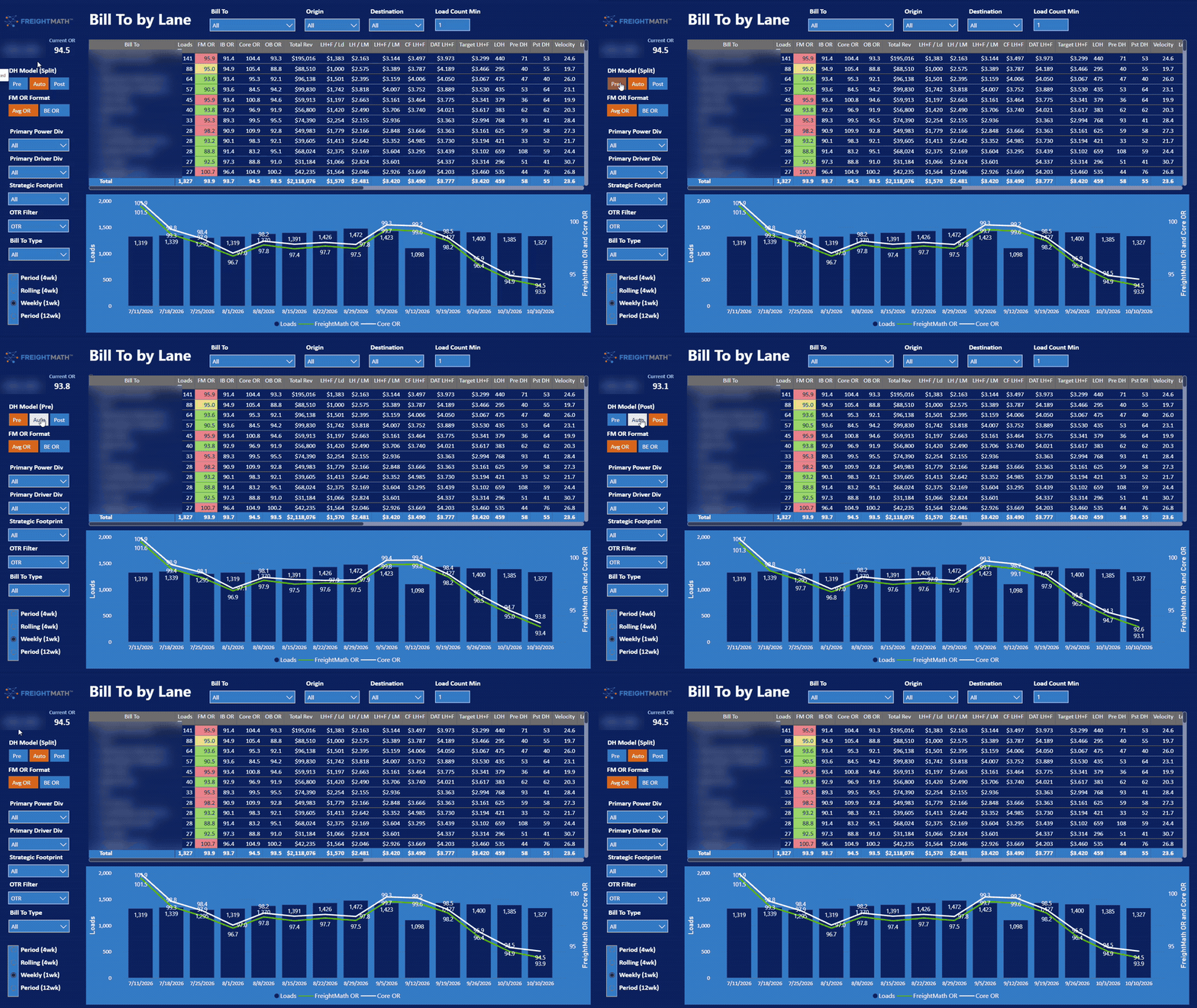
For the three models themselves, see Deadhead Cost Allocation in the Segment Level Costing reference:
- PRE: Empty before pickup, attributed to the next order loaded.
- POST: Empty after delivery, attributed to the prior order delivered.
- SPLIT: Empty costs shared equally between the preceding and following order.
We will be sending a survey this week that captures, among other things, your preferred deadhead model. Your answer is what Auto will follow for your network, so watch for it.
Improvements
- Driver Pay: The most recent week is no longer costed from incomplete payroll data.
- Driver Pay Extract: Hourly rates can now be provided at the driver level.
- Deadhead: The dashboard can now follow the model configured for your network rather than a fixed SPLIT view.
Fixes
- Driver Pay timing: Resolved the issue where payroll was not complete when Orders and Segments were sent, which left the most recent week with partial Driver Pay.