
Release Notes
Fuel by Bill To tracks fuel surcharge against the EIA diesel rate
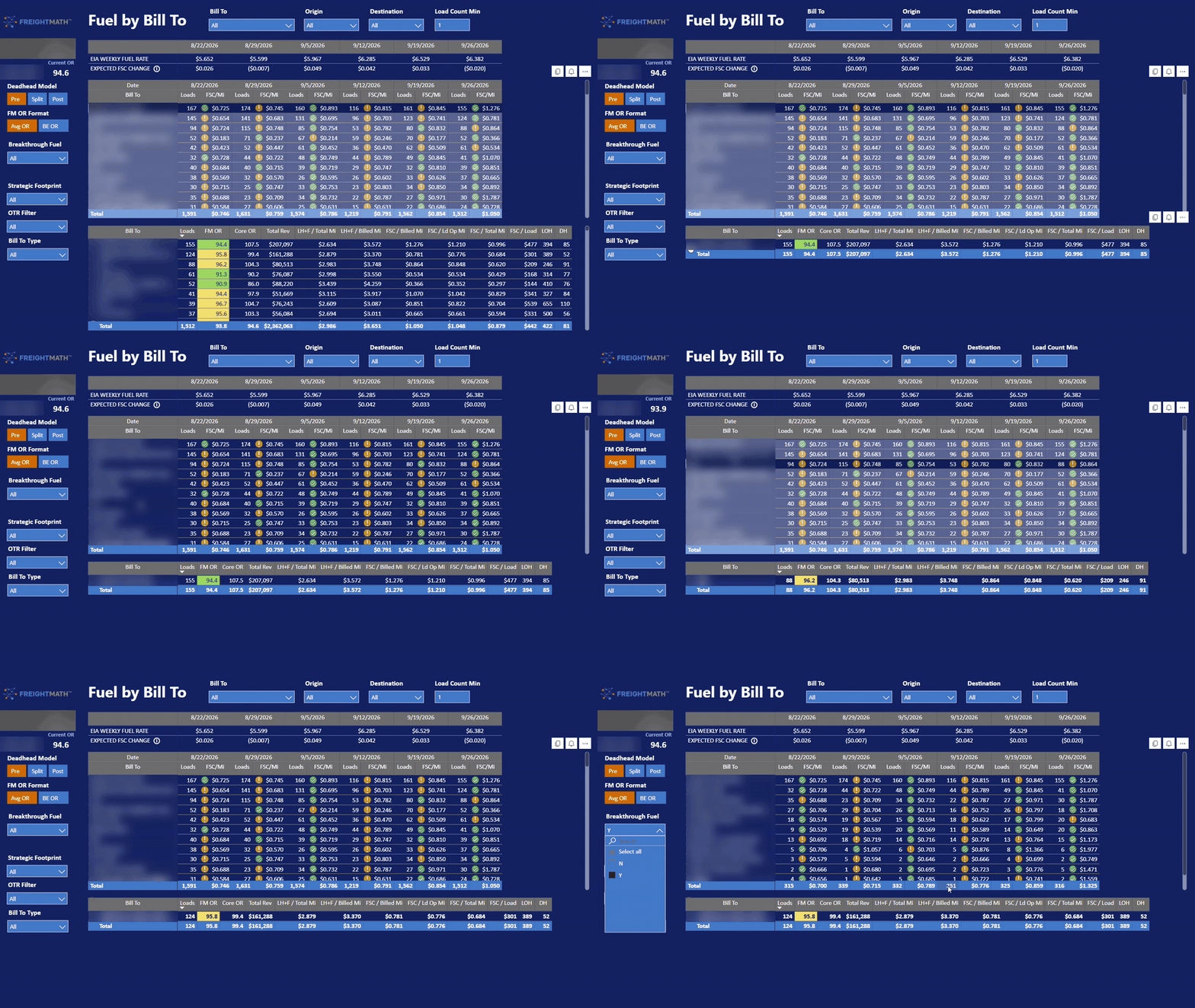
Fuel by Bill To now shows the EIA weekly diesel rate and the expected change in fuel surcharge per mile, flags each customer's FSC/Mi against it, and adds a Breakthrough Fuel slicer.
This release updates the Fuel by Bill To page so you can see, week by week, whether each customer's fuel surcharge is keeping pace with the EIA weekly diesel rate. It also adds a Breakthrough Fuel slicer to separate BTF customers from the rest of the network.
Highlights
- EIA Weekly Fuel Rate — now appears above the Bill To table for each week in view.
- Expected FSC Change — shows how much fuel surcharge per mile should have moved based on the EIA rate.
- FSC/Mi conditional formatting — each icon now tells you whether a customer's fuel surcharge moved the way the EIA rate says it should have.
- Breakthrough Fuel slicer — filters the view to BTF or non-BTF customers.
What's new
EIA Weekly Fuel Rate and Expected FSC Change
Two new rows sit at the top of Fuel by Bill To, aligned to the same weekly columns as the Bill To table:
- EIA Weekly Fuel Rate: The U.S. EIA weekly on-highway diesel price for each week.
- Expected FSC Change: The change in fuel surcharge per mile the EIA move implies. The rule is $0.01/mile for every $0.075/gallon change in the EIA rate, staggered one week. Hover the info icon next to the row label to see the formula.
Why the stagger: Fuel surcharge tables reset off the prior week's published rate. The EIA rate from 9/19 is the rate in effect for the week ending 9/26, so FreightMath compares each week's fuel surcharge to the EIA rate that was actually driving it.
FSC/Mi conditional formatting based on the EIA rate
The icons next to each Bill To's weekly FSC/Mi now compare that customer's week-over-week change in fuel surcharge per mile to the Expected FSC Change:
- Green check: FSC/Mi moved in line with the expected change.
- Caution: FSC/Mi did not follow the EIA rate. That can mean surcharge is lagging when diesel goes up, or falling faster than it should when diesel comes down.
This replaces a blanket percentage threshold. Fuel surcharge does not always go up, so tying the formatting to the EIA rate catches problems in both directions. A Bill To running $0.000 week after week will also stand out immediately.
Scan for customers with repeated caution icons, then select the Bill To to populate the detail table below with FM OR, Core OR, Total Revenue, LH+F per Total and Billed Mile, FSC per Billed, Loaded Op, and Total Mile, FSC/Load, LOH, and DH.
Breakthrough Fuel slicer
A new Breakthrough Fuel slicer on the left side of the page filters the Bill To table to customers on Breakthrough Fuel (Y) or not (N). BTF customers settle fuel differently than a standard fuel surcharge table, so reviewing them separately keeps them from being flagged against an EIA-based expectation that does not apply.
The Breakthrough Fuel slicer is only as accurate as the BTF flag on each customer in the Network Configuration app. If a BTF customer is not flagged, it will be mixed in with standard fuel surcharge customers and its icons will be misleading. Review your customer list in Network Configuration and confirm every Breakthrough Fuel customer is marked as such.
Improvements
- Fuel by Bill To: Simplified conditional formatting replaces the prior threshold logic, reducing confusion when reading weekly FSC/Mi trends.
Fixes
None reported this week.