Release Notes
Introducing app.freightmath.com, the new home of FreightMath
FreightMath now has a new home at app.freightmath.com, with Spot Check, Trip Check, the Dedicated Pricing Tool and Activity Hub live today.
Today marks a milestone for FreightMath. We are introducing app.freightmath.com, the new home of the platform for all clients. Your costing, profitability and pricing tools will live in one place, and your analytics dashboards will follow over the coming months.
Highlights
- One new home. app.freightmath.com will be where every client accesses FreightMath.
- Reimagined Spot Check. Price individual spot opportunities against your true cost and the market.
- Three new tools. Trip Check, the Dedicated Pricing Tool and Activity Hub are live today.
- SharePoint is being retired. Dashboards and applications will migrate into the new app over the coming months, with notice ahead of each change.
What's new
Spot Check
Price individual spot opportunities against your true cost and the market.
Trip Check
Evaluate the profitability of specific trips and tours.
Dedicated Pricing Tool
Build and test dedicated pricing.
Activity Hub
Track your team's usage and the outcome of every quote.
Spot Check
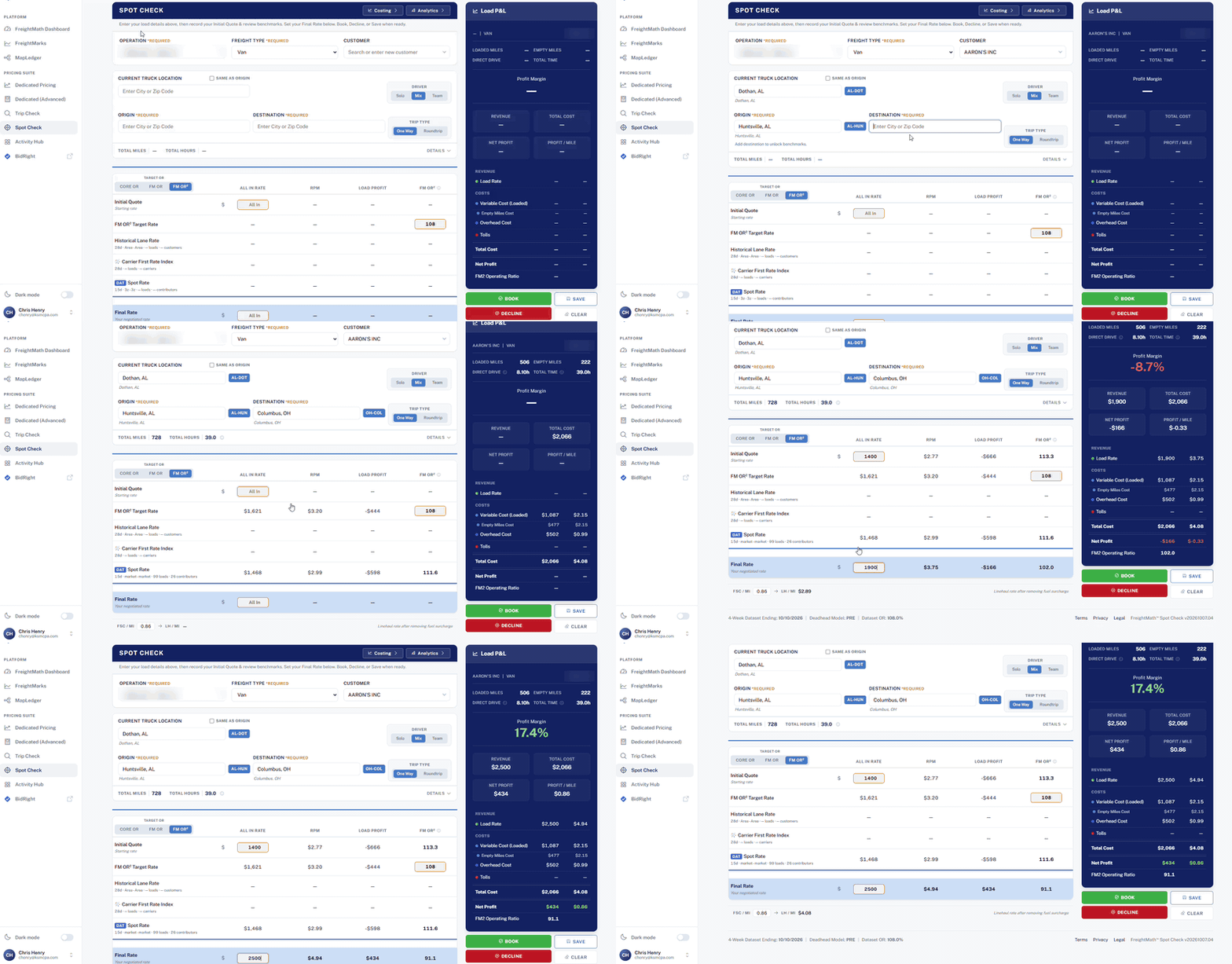
The reimagined Spot Check prices an individual spot opportunity against your true cost and the market. It incorporates more than thirty requests for improvements and changes from the legacy app. Embedded cost and analytics features are coming soon, and video tutorials will follow.
How to use it:
- 1
Enter the load
Choose the Operation, freight type and customer, then enter the truck location, origin and destination.
- 2
Record your Initial Quote
Compare it with the FM OR target rate, the historical lane rate and the market spot rate.
- 3
Set your Final Rate
Watch the Load P&L update with revenue, cost, net profit and the FM OR.
- 4
Book, Decline or Save
Record the outcome so it appears in Activity Hub.
Trip Check
Trip Check evaluates the profitability of specific trips and tours so you can see the result before you commit equipment.
Dedicated Pricing Tool
The Dedicated Pricing Tool lets you build and test dedicated pricing in the same place you price spot freight.
Activity Hub
Activity Hub tracks your team's usage and the outcome of every quote, so you can see what was priced, what was booked and what was declined.
Start using app.freightmath.com for Spot Check, Trip Check, Dedicated Pricing and Activity Hub. No action is needed for your existing dashboards today.
Coming soon
Dashboards in the app
All of your FreightMath analytics dashboards will be embedded directly in app.freightmath.com, giving you one place for your costing, profitability and pricing tools.
SharePoint retirement
Over the coming months we will retire SharePoint infrastructure entirely. We will share timing and transition details well ahead of each change, so there will be no disruption to your reporting.
Spot Check cost and analytics
Embedded cost and analytics features inside Spot Check.
Video tutorials
Short walkthroughs for each tool.
Improvements
- Spot Check: Incorporates more than thirty requests for improvements and changes from the legacy app.
Fixes
None reported this release.
Known issues
None at this time.